Setting up a home network
Before you start: To decide what type of network to set up or to find out what hardware and cables you need.
Once you know what type of network you want, and you have the necessary hardware, there are four steps you might need to take:
⦁ Install any necessary hardware.
⦁ Set up an Internet connection (optional).
⦁ Connect the computers.
Each of these steps is described in detail later in this article.
Start by setting up just one computer to make sure the network is working before you try to add additional computers or devices.
Note
⦁ The information in this article is written for people who have a broadband connection—usually DSL, cable, or Fiber Optic Service (FiOS)—to the Internet rather than a dial-up connection. However, you don't need an Internet connection to set up a network.
1. Install the hardware
Install network adapters in any computers that need them, or connect them to the computers.
2. To Share your Internet connection
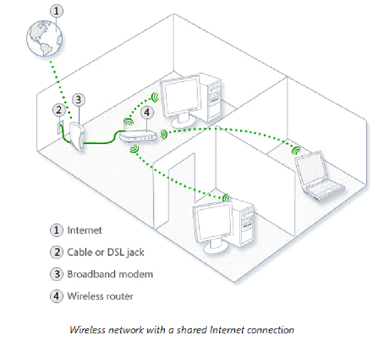
You can share one Internet connection among two or more network computers. To do that, you can either use an intermediary device, which is a device located between the Internet connection and your computer, or set up Internet Connection Sharing (ICS).
3. Connect the computers
There are several ways to connect computers:
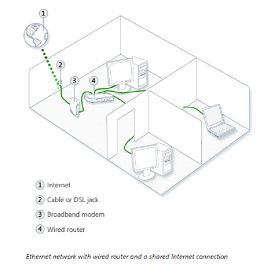
Ethernet networks
You need a hub, switch, or router to connect computers using an Ethernet connection.
Wireless networks