NETWORKING
Connecting Computers and Devices.
A Network is a group of computers or other devices, such as printers and scanners, that communicate either wirelessly or by using a physical connection, such as an Ethernet cable or a phone line.
What you need to set up a home network
The variety of options for home networking can make buying decisions difficult. Before you decide what hardware to get, you should decide what type of network technology (the way computers in a network connect to or communicate with one another) to use. This article describes and compares the most common network technologies and lists hardware requirements for each.
NETWORK TECHNOLOGIES
The most common types of network technology are wireless and Ethernet. When choosing a network technology, consider the location of your computers and the desired speed of your network. The costs of these technologies are similar. The sections below compare these two technologies.
WIRELESS
Wireless networks use radio waves to send information between computers. The three most common wireless network standards are 802.11b, 802.11g, and 802.11a. A new standard, 802.11n, is expected to grow in popularity.
SPEED
⦁ 802.11b: transfers data at a maximum rate of 11 megabits per second (Mbps). Downloading a 10 megabyte (MB) photo from the Internet under optimal conditions takes about 7 seconds.
⦁ 802.11g: transfers data at a maximum rate of 54 Mbps. Downloading a 10 megabyte (MB) photo from the Internet under optimal conditions takes about 1.5 seconds.
⦁ 802.11a: transfers data at a maximum rate of 54 Mbps. Downloading a 10 megabyte (MB) photo from the Internet under optimal conditions takes about 1.5 seconds.
⦁ 802.11n: depending upon the number of data streams the hardware supports, 802.11n can theoretically transmit data at up to 150 Mbps, 300 Mbps, 450 Mbps, or 600 Mbps.
Note
⦁ The transfer times listed are under ideal conditions. They aren't necessarily achievable under normal circumstances because of differences in hardware, web servers, network traffic conditions, and so on.
PROS
⦁ It's easy to move computers around because there are no cables.
⦁ Wireless networks are usually easier to install than Ethernet.
CONS
⦁ Wireless is often slower than the other technologies.
⦁ Wireless can be affected by interference from things such as walls, large metal objects, and pipes. Also, many cordless phones and microwave ovens can interfere with wireless networks when they're in use.
⦁ Wireless networks are typically about half as fast as their rated speed under all but ideal conditions.
ETHERNET
Ethernet networks use Ethernet cables to send information between computers.
SPEED
Ethernet transfers data at up to 10, 100, or 1000 Mbps, depending on the type of cables used. Gigabit Ethernet is the fastest, with a transfer rate of up to 1 gigabit per second (or 1000 Mbps).
For example, downloading a 10 megabyte (MB) photo from the Internet under optimal conditions can take about 8 seconds on a 10 Mbps network, about 1 second on a 100 Mbps network, and less than a second on a 1000 Mbps network.
PROS
⦁ Ethernet networks are inexpensive and fast.
CONS
⦁ Ethernet cables must be run between each computer and a hub, switch, or router, which can be time-consuming and difficult when the computers are in different rooms.
Hardware requirements
There are several kinds of hardware used in home networks:
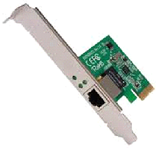
Network adapters. These adapters (also called network interface cards, or NICs) connect computers to a network so that they can communicate. A network adapter can be connected to the USB or Ethernet port on your computer or installed inside your computer in an available Peripheral Component Interconnect (PCI) expansion slot.
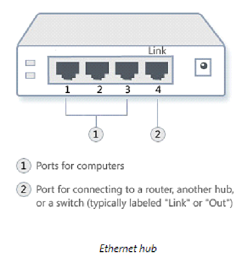
Network hubs and switches. Hubs and switches connect two or more computers to an Ethernet network. A switch costs a little more than a hub, but it's faster.
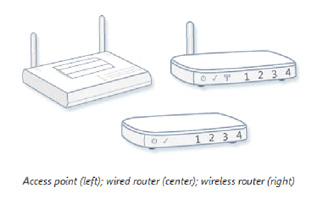
Routers and access points. Routers connect computers and networks to each other (for example, a router can connect your home network to the Internet). Routers also enable you to share a single Internet connection among several computers. Routers can be wired or wireless. You don't need to use a router for a wired network but we recommend it if you want to share an Internet connection. If you want to share an Internet connection over a wireless network, you will need a wireless router. Access points allow computers and devices to connect to a wireless network.