ERGONOMICS
Ergonomics is the science of designing equipment for a safe and comfortable working environment.
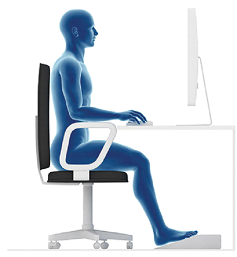
PREVENT BACK AND NECK STRAIN
You can avoid back and neck strain by ensuring that your chair provides proper support and by placing the monitor where you can comfortably view the screen.
MONITOR PLACEMENT
The top edge of the monitor should be at eye level or slightly lower. You can use a monitor stand or telephone book to raise the monitor to the appropriate level on your desk.
POSTURE
When seated, ameke sure your feet are flat on the floor an you do not lean forward or slouch in your chair. You should lift positions often and stand up to stretch your arms and legs at least once an hour.
CHAIR
Look for a fully adjustable chair tha provides support for your lower back. Contoured hair seats help blood circulate more freely by relieving pressure on the legs.
PREVENT WRIST STRAIN
You can avoid wrist strain when typing by keeping your elbows level with the keyboard and keeping you twists straight and higher than your fingers.
CARPAL TUNNEL SYNDROME (CTS)
Carpal Tunnel Syndrome is a Repetitive Strain Injury (RSI) whose symptoms include numbness, tingling and pain in the fingers. The condition affects some workers who type without proper wrist support or type for long periods of time without breaks.
WRIST REST
You can use a wrist rest with your keyboard to elevate your wrists and ensure they remain straight at all the times. Some mouse pads also come with built-in rests.
KEYBOARD SHELF
You can use a keyboard shelf to help keep your elbows level with the keyboard. At keyboard shelf lets you adjust the height and position of the keyboard and slides under the desk to provide more desk space.