Home Computers 1 Computers 2 Computers 3 Computers 4 Computers 5 Computers 6 Computers 7 Computers 8 Computers 9 About

Computers 5

Theory, Applications and Concepts


INSIDE A COMPUTER

All computers contain the same basic components.
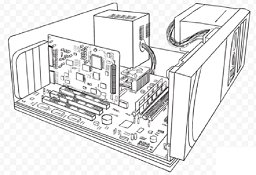
POWER SUPPLY

A power supply changes normal household electricity into a form that a computer can use.

HARD DRIVE

A hard drive is the primary device that a computer uses to store information.

EXPANSION CARD

An expansion card lets you add new features to a computer. For example, an expansion card can give a computer the ability to record and play sound.

EXPANSION SLOT

An expansion slot is a socket on the system board. An expansion card plugins into an expansion slot.

FLOPPY DRIVE

A floppy drive stores and retrieves information on floppy disks.

DRIVE BAY

A drive bay is a space inside the computer case where a hard drive, floppy drive, CD-ROM drive or DVD-ROM drive sits.

CD-ROM or DVD-ROM Drive

A CD-ROM drives reads information stored on compact discs (CDs). A DVD-ROM drive reads information stored on CDs and DVD-ROM Discs.

RANDOM ACCESS MEMORY (RAM)

RAM temporarily stores information inside a computer. This information is lost when you turn off the computer.

CENTRAL PROCESSING UNIT (CPU)

A CPU is the main chip in a computer. The CPU processes instructions, performs calculations and manages the flow of information through a computer.

POWER SUPPLY

A power supply changes the alternating current (AC) that comes from an outlet to the direct current (DC) that a computer can use.

The capacity of a power supply is measured in watts. An average computer uses up to 200 watts, whereas an average light bulb uses 60 watts.

A fan inside the power supply prevenSERIAL PORTts the parts inside a computer from overheating.

PROTECT YOUR EQUIPMENT

Changes in electrical power can damage equipment and information.

SURGE PROTECTOR

A surge protector, or surge supressor, guards a computer against surges. A surge is a fluctuation in power. These fluctuations happen most often during storms.

UPS

An Uninterruptible Power Supply (UPS) protects a computers from a loss of power. A UPS contains a battery that stores electrical power. If the power fails, the battery can run the computer for a short time so you can save your information.

PORT

A port is a connector at the back of a computer where you plug in an external device such as printer or modem. This allows instructions and data to flow between the computer and the device.

PARALLEL PORT

A parallel port has 25 holes. This type of port is known as a female connector. A parallel port connects a printer or tape drive.

A computer internally labels each parallel port with the letters LPT. The first parallel port named LPT1 and the second is named LPT2 and so on.

There are two enhanced types of parallel ports ---- Enhanced Parallel Port (EPP) and Extended Capabilities Port (ECP). These types of parallel ports increase the speed at which information flows between the computer and a device.

MONITOR PORT

A monitor port connects a monitor.

SERIAL PORT

A serial port has either 9 or 25 pins. this type of port is known as a male connector. A serial port connects a modem or mouse.

USB PORT

Universal Serial Bus (USB) is a type of port that allows you to connect up to 127 devices using only one power.