DIALOG BOXES
Lets code the three different kinds of dialog boxes using coding technique, no drag and drop of controls!
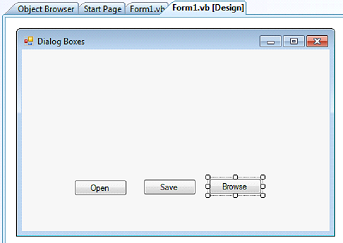
THE CODE
Public Class Form1
Private Sub Button1_Click(ByVal sender As System.Object, ByVal e As System.EventArgs) Handles Button1.Click
Dim OpenDialogAdd As New OpenFileDialog()
OpenDialogAdd.FileName = ""
OpenDialogAdd.Filter = "Web Files |*.htm; *.html| Text Files | *.txt| VStudio |*.vb; *.cs| All Files| *.*"
OpenDialogAdd.InitialDirectory = "C:\"
OpenDialogAdd.ShowDialog()
Dim sFile As String = ""
If OpenDialogAdd.CheckFileExists And (OpenDialogAdd.FileName <> "") Then
'NotepadFilename = OpenDialogAdd.FileName
'RichTextBox1.LoadFile(OpenDialogAdd.FileName, RichTextBoxStreamType.PlainText)
End If
End Sub
Private Sub Button2_Click(ByVal sender As System.Object, ByVal e As System.EventArgs) Handles Button2.Click
Try
Dim saveDialog As New SaveFileDialog()
'saveDialog.FileName = NotepadFilename
saveDialog.Filter = "All Files| *.*"
saveDialog.InitialDirectory = "C:\"
saveDialog.ShowDialog()
Dim sFile As String = ""
If saveDialog.FileName <> "" Then
'RichTextBox1.SaveFile(saveDialog.FileName)
'NotepadFilename = "C:\ShellCities\Programs\Notepad\" & saveDialog.FileName
End If
Catch ex As Exception
End Try
End Sub
Private Sub Button3_Click(ByVal sender As System.Object, ByVal e As System.EventArgs) Handles Button3.Click
Dim BrowseDialog As New FolderBrowserDialog
BrowseDialog.ShowDialog()
If (BrowseDialog.SelectedPath IsNot Nothing) Then
'TextBox1.text = BrowseDialog.SelectedPath
End If
End Sub
End Class