THE BUTTON, TEXTBOX AND LABEL CONTROL
The button Control is being use for Push Button (PB) commands - What will you do after you push the button?
Drag and Drop the control and you'll see the figure below:
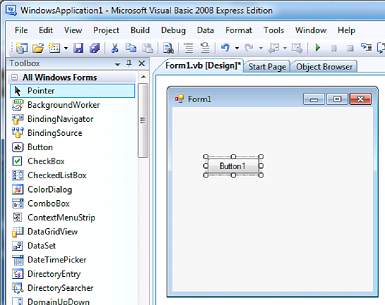
To see the source code, DOUBLE CLICK the control.
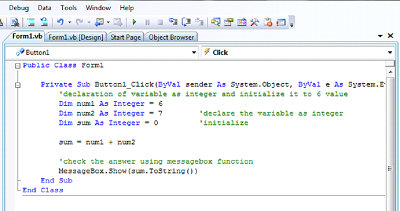
Moving Forward to Real Programming Application of sample
Here we'll use the following Controls:
⦁ Button Control
⦁ TextBox Control - This control is being use for input and allowing you to use that for processes.
⦁ Label Control - This control adds a caption for user to understand what he'll do to the said transaction.
First, Draw the figure below
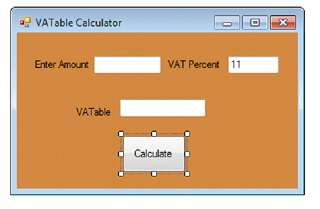
At Properties Window
Form1
BackColor Peru
Button1
Text Calculate
Label1
Text Enter Amount
Label2
Text VAT Percent
Label3
Text VATable
TextBox2
Text 11
THE CODE
'declaration of variable as Single and initialize it to 0 value
Dim Amount As Single = Convert.ToSingle(TextBox1.Text)
'declare the variable as Single
Dim percent As Single = Convert.ToSingle(TextBox2.Text) / 100
Dim Vatable As Single = 0
Vatable = Amount * (1 - percent)
TextBox3.Text = Vatable.ToString()